Paymentalipay for foreigners
How should a first-time foreign visitor pay in China?
Set up one primary mobile wallet before departure, rehearse the scan-or-show-code flow, and keep a card plus small cash reserve as the fallback.
Payment readiness
In short
Most first-time visitors should prepare Alipay or Weixin Pay with an international card before departure, then keep a physical card and small cash backup for the first 48 hours. The practical goal is not perfect coverage; it is being able to complete the first small purchase without debugging in a queue.
Add payment to checklistApplies to
International travelers using foreign-issued cards, mobile wallets, hotels, restaurants, taxis, convenience stores, metro counters, and ticket desks in mainland China.
Check before you rely on it
Wallet screens, card support, identity checks, fees, limits, and bank fraud rules can change. Confirm the current flow inside the official app and keep a second payment path ready.
Information checked:
Wallet setup, card fallback, QR payment habits, and recovery moves to rehearse before the first checkout in China.
Payment answers
These guides target the exact questions visitors ask before they trust Alipay, Weixin Pay, cards, cash, or metro payment in China.
Set up one primary mobile wallet before departure, rehearse the scan-or-show-code flow, and keep a card plus small cash reserve as the fallback.
Nihao China is best treated as a visitor-first bridge for payment, transport, online services, and translation, not as the only wallet or travel operating system. Try it before departure, but keep Alipay, Weixin Pay, card, cash, and staffed-counter backups ready.
Tourists should consider Nihao China as a useful extra if the official app supports their card, phone, route, and first cities. It should not be the only plan until one low-stakes live payment or transport action has worked.
For most first trips, Alipay or Weixin Pay should be the primary tested wallet because they are more established at everyday checkout. Nihao China can still be a valuable visitor-first layer if it works for your card, city, transport, and backup needs.
Use one established wallet you can operate quickly, usually Alipay or Weixin Pay, and treat Nihao China as a useful visitor-first extra if it works with your card, device, and city.
Many foreign visitors can use Alipay after installing the official app, registering, and linking an eligible international card, but they should verify the live app flow and keep Weixin Pay, card, or cash as a backup.
Step out of the queue, try the second wallet or a merchant-scan flow, use a staffed counter when available, and fall back to card or small cash instead of debugging under pressure.
Do not make a foreign credit card the only payment plan. Use it as a backup for hotels, larger merchants, or wallet linking, and prepare a tested mobile wallet plus a small cash reserve for smaller everyday payments.
When payment fails
The highest-stress payment moment is not installation. It is the first real checkout when QR type, card risk checks, mobile data, and merchant behavior meet.
Decide whether to use the new visitor app, an established wallet, or a backup option before the first checkout.
Compare payment appsAnswer four quick prompts and get the next calm move for Alipay, Weixin Pay, QR, network, card, or identity failures.
Use toolUse this troubleshooting guide when Alipay or Weixin Pay is linked to an overseas card but fails at a shop, restaurant, taxi, QR menu, or ticket counter.
Open failure guidePayment failures can be connectivity failures. Confirm eSIM, roaming, VPN, hotel Wi-Fi, and SMS behavior before the first checkout.
Check phone setupDecision table
Three official pages publish these lists. They do not agree, so each cell names the list it came from.
American Express is listed for Weixin Pay by Tencent and by the central bank's guide. It does not appear on any of the three official Alipay lists we read. An Amex-only traveler should set up Weixin Pay rather than assume no wallet takes the card.
Three official pages publish these lists and they do not match. Tencent's own article is the newest and the widest, and it is the only one that names UnionPay for Weixin Pay. The central bank's guide is the 2024 edition. Beijing's municipal page is from July 2023 and is the narrowest: it leaves JCB off Alipay's list and never mentions American Express at all. If your network appears on the newer list but not the older one, the newer list is the operator's own.
Source: Tencent — Mobile Payment Solutions for Your China Journey: A Practical Guide (June 18, 2025; read July 24, 2026)
Source: People's Bank of China — Guide to Payment Services in China (2024 edition, page updated May 25, 2024; read July 24, 2026)
Source: Beijing Municipal Government — Overseas Bank Cards Accepted by Weixin Pay and Alipay (July 25, 2023; read July 24, 2026)
A UnionPay card is stated to be accepted by every merchant POS terminal in the Chinese mainland. Other networks are accepted where their logo is shown at the checkout counter.
Weixin Pay also publishes what it charges an international card: the transaction fee is waived for a single transaction under 200 RMB. A single transaction above 200 RMB carries a 3% fee. If a transaction is refunded, the fee is reimbursed in proportion to the refunded amount. Single transactions are capped at 6,500 RMB, with 50,000 RMB a month and 65,000 RMB a year cumulative.
Source: People's Bank of China — Guide to Payment Services in China (2024 edition, page updated May 25, 2024; read July 24, 2026)
Source: The State Council of the People's Republic of China — Payment service guide for overseas visitors to China (April 11, 2024; read July 24, 2026)
Source: Tencent / WeChat Help Center — Guide to Add and Use International Cards with Weixin Pay (read July 24, 2026)
Cash rules
Since February 1, 2026, refusing RMB cash is against the rules, not a shop's preference.
Article 3: business operators and charging bodies must respect the payer's choice of a lawful payment method. They may not refuse cash, may not induce anyone else to refuse it, and may not treat a cash payer worse than an app payer.
Article 4: cash must be supported where payment is collected by a person, where a face-to-face service is provided, and where the booking happens online but the goods or service are handed over in person.
Article 5: self-service settings must still meet cash needs in special situations, and the rules name mobile payment being unusable, network failure and equipment failure. The accepted payment methods, the cash conversion route and a service contact phone number must be displayed in a conspicuous position, and the conversion route cannot carry a fee.
Article 11: a merchant may not refuse a payer for offering a large quantity of coins or small notes. It has to negotiate or direct the payer to a bank to exchange them.
Article 12(4): banks are directed to make cash services convenient for elderly people, disabled people and people from outside the mainland, and to site cash machines with those needs in mind.
Article 15: a person who meets a refusal of cash or discriminatory treatment of cash may keep the evidence and apply to the local branch of the central bank to have their rights protected. Article 16: penalised parties are named publicly.
People's Bank of China, National Development and Reform Commission, National Financial Regulatory Administration
What this changes at the counter: if a wallet fails, cash is a route the merchant is required to take, and an unattended machine has to show a service phone number you can call. If cash is refused anyway, keep the evidence and take it to the local central bank branch instead of arguing at the till. The provisions took effect February 1, 2026; page read July 24, 2026.
Open source: Announcement [2025] No. 29 and the Provisions on RMB Cash Receipts, Payments and ServicesTrip path
Use this page for the wallet rehearsal step, then continue into first transfer, first meal, support, and route decisions.
01
Needs live checkConfirm passport, route, stay length, first entry city, arrival card, and whether a visa-free, visa, or transit path applies.
Traveler job
Know whether the trip can legally start before buying more plans.
02
Use with caveatMake maps, translation, wallet prompts, hotel details, and support contacts usable before leaving the airport.
Traveler job
Keep the phone useful when the traveler is tired, offline, or moving.
03
Use with caveatPrepare one primary wallet, one linked card, one backup card or cash path, and the first small checkout flow.
Traveler job
Complete the first snack, taxi, or restaurant payment without debugging in a queue.
04
Needs live checkChoose the first airport-to-hotel route, save the hotel address in Chinese, and keep a fallback if data or payment is slow.
Traveler job
Reach the hotel without making the airport arrival the hardest part of the trip.
05
ReadyPick one low-friction meal area or restaurant type and prepare ordering, dietary, and QR-payment fallback notes.
Traveler job
Eat something simple before chasing the perfect food plan.
06
ReadySave emergency numbers, insurer details, consular support, hotel contacts, and lost-passport backup before travel day.
Traveler job
Know who to contact if luggage, payment, health, documents, or transport fails.
07
ReadyChoose a first base and route shape only after entry, phone, payment, transfer, meal, and support basics are stable.
Traveler job
Avoid building an exciting route on top of unresolved first-day risk.

First live payment
Remove the most common payment fear before China: not whether mobile payments exist, but whether the first real transaction will feel awkward, declined, or confusing.
Next readiness step
The first successful payment depends on phone data, app access, ordering context, and a backup if the wallet fails.
Payment setup depends on data, SMS or identity prompts, maps, and translation working when the traveler leaves arrivals.
Check connectivityThe first checkout is often a restaurant or coffee counter. Plan the ordering and payment moment together.
Plan first mealUse the checklist to keep wallet, card, cash, hotel address, and support contacts in one first-day sequence.
Open checklistOfficial videos
These are Tencent's official Weixin Pay tutorial videos. They make the scan/pay-code flow visible, which is much more useful than asking travelers to imagine the cashier moment.
Tencent
Tencent's official starter video helps visitors recognize the account and services area before they try to pay in China.
Open official videoTencent
This official tutorial is useful for the mainland China Weixin Pay setup path, including the point where card and identity checks matter.
Open official videoTencent
The most useful payment video for first-time visitors: it shows the in-store QR flow before the traveler is standing at a cashier.
Open official videoBefore-flight setup
For many visitors, the real move is not handing a foreign card to a small merchant. It is linking that card to a mobile wallet, then using QR payment like a local checkout flow.
Choose Alipay or Weixin Pay as the first method you will try in China. Do not make the traveler choose at the cashier.
Traveler move
Install the app, sign in, and find the payment code before departure.
The lists differ per wallet. Tencent lists Visa, Mastercard, JCB, American Express, Discover Global Network including Diners Club, and UnionPay for Weixin Pay. The central bank's 2024 guide lists Visa, Mastercard, JCB, Diners Club and Discover for Alipay, and American Express does not appear on any official Alipay list we read.
Traveler move
Check your network against the table below, then keep a second card ready.
China checkout usually means either scanning the merchant QR code or showing your own payment code for the cashier to scan.
Traveler move
Practice opening Scan and Pay Code once while still calm.
Foreign cards can work at hotels, airlines, larger stores, and some ticket counters, but many small merchants are wallet-first. Cash is the fallback with rules behind it: since February 1, 2026, a merchant may not refuse RMB cash or treat a cash payer worse.
Traveler move
Carry a physical card and small cash reserve for the first 48 hours.
Before you book · May 3, 2026
Recent official Alipay, WeChat Pay HK, UnionPay, and Weixin Pay references clarify the payment model while keeping app-screen details as live checks.
Ant Group / Alipay
Confirms Alipay's QR-code model is the dominant payment pattern in China. Sets expectation that QR scanning is normal and safe.
Open official sourceTencent / WeChat Pay Hong Kong
For HK visitors this is an official guide. For non-HK foreigners, it shows that WeChat Pay integration with mainland merchant QR codes is the payment model — useful context even if HK-specific.
Open official sourceChina UnionPay / UnionPay International
Explains how non-Chinese cards can work in China through UnionPay rails and where acceptance is most reliable.
Open official sourceTencent / Weixin Pay
Explains where Weixin Pay works day-to-day (subway QR, restaurants, shops) and how it differs in ecosystem approach versus Alipay.
Open official sourceAll Alipay English documentation paths return 404, system error pages, or JS-only renders with no extractable content. The inbound tourist visitor card feature launched in 2023 has no accessible static English help page.
Merchant/dev portals and help centers are JS-rendered or require login; no public static visitor help page accessible.
Site returns JS-only or 404 for cardholder pages and sitemap; static fetch not viable.
No static video page found; Alipay official YouTube channel not confirmed.
Recent payment changes
When payment options change, the safest user promise is still simple: verify the live app path, try one small payment, and keep a fallback before relying on it for taxis, food, or tickets.
Shenzhen Government Online reports a Tencent/PayPal QR-payment connection for U.S.-based PayPal users across Weixin Pay merchants in mainland China. We did not re-verify its current status in the July 24, 2026 source pass, so treat it as a promising extra path until you confirm eligibility, app version, region rollout, fees, limits, and a live small payment.
Open Shenzhen updateThe central bank, the National Development and Reform Commission and the National Financial Regulatory Administration issued Announcement [2025] No. 29 with the Provisions on RMB Cash Receipts, Payments and Services. Refusing cash, inducing others to refuse it, and treating cash payers worse are all prohibited, and unattended machines must show a fee-free cash route and a service phone number.
Open the cash provisionsUnionPay International launched the app at the China International Travel Mart on December 19, 2025 and announced it on December 24, 2025. The cards it binds are UnionPay, Visa and Mastercard issued outside the Chinese mainland. American Express, JCB, Discover and Diners Club are not named, and no fee or transaction limit is published on either UnionPay page.
Open the launch announcementTrusted setup sources
Some setup topics have stable official references, while wallet screens and card-binding flows can change inside the app. That distinction keeps the guidance honest for travelers.
Strong official tutorial
Airalo's help center provides a full iOS setup path with QR and manual methods. Use it for app-level eSIM screenshots and pre-flight instructions.
Open sourceStrong official tutorial
The Android guide is usable for device setup language, but the page should still warn that Android menus vary by manufacturer.
Open sourceImportant caveat source
Apple confirms China mainland eSIM limitations by iPhone model and purchase region, so do not assume universal eSIM support.
Open sourceUseful but scoped
WeChat Pay HK can be relevant for Hong Kong-number users crossing into mainland China, but it should not be presented as the default global visitor path.
Open sourceOfficially sourced wallet flows
Stable official guidance is separated from card-binding screens that can change inside Alipay or Weixin Pay, so travelers get practical steps without false certainty.
Risk: medium
Risk: medium
Live app confirmation
These gaps stay visible so the page earns trust: wallet screens, supported cards, and limits can change inside Alipay or Weixin Pay.
Alipay account setup (foreign visitors)
Open Alipay and confirm the supported card brands, identity prompts, and any spending limits inside the live app before relying on it for your first checkout.
WeChat/Weixin Pay card linking and payment
Open WeChat or Weixin Pay and confirm the card-linking, identity, and mainland payment prompts inside the live app before travel day.
eSIM installation — Android (provider help)
Use the eSIM provider guide for the exact install steps, then confirm the final Android menu names on your phone because settings vary by manufacturer.
China carrier eSIM activation (store flow)
Treat mainland carrier eSIM activation as an in-store confirmation item unless your phone, passport, and plan are confirmed by the carrier before arrival.
Evidence gate
Scoped official sources are separated from app-screen details that travelers should recheck inside the live wallet before relying on them.
Official but scoped
Use as a scoped payment reference for Hong Kong wallet users crossing into mainland China.
Open official sourceLive app checks
Alipay visitor card setup is best handled through the live app or official help path when screen flows change.
For Weixin Pay, confirm the current inbound visitor card-binding guidance in the app or official help pages.
Use UnionPay International and carrier eSIM pages as live references when screen flows or plan terms may change.
Card reality
This is the explanation most pages skip. The card still matters, but in everyday China it often works best as the funding source behind Alipay or Weixin Pay.
Small restaurants, coffee, taxis, convenience stores
Best path: Mobile wallet linked to your foreign card
The merchant normally expects QR payment. The card sits behind Alipay or Weixin Pay instead of being handed to the cashier.
Hotels, airlines, high-end stores, some ticket counters
Best path: Physical Visa/Mastercard/AmEx or UnionPay card if accepted
Larger merchants are more likely to have card terminals, but acceptance is not universal. Keep the wallet ready anyway.
Metro, bus, local transport QR, food courts
Best path: Wallet transport code or single-ride ticket backup
Transport is usually app or QR-code oriented. If the transport code fails, use a machine, counter, or help desk.
Wallet/card verification fails
Best path: Second wallet, second card, then cash
Do not debug in a queue. Step aside, switch data/Wi-Fi, try the fallback, and resolve the wallet later. A staffed counter has to take cash, and an unattended machine has to display a cash route and a service phone number.
Decision point
Payment is one of the biggest first-day questions for visitors, so this works like a money setup desk rather than a wallet blog.
The comparison page for travelers who need one wallet to lead and one backup to stay quiet.
Best option
Choose one primary wallet before departure.
Backup option
Keep the second wallet or a card until the first payment succeeds.
Best when the wallet layout feels easier to rehearse and you want a clean fallback path.
Best option
Set up Alipay before departure and open the payment area once.
Backup option
Let Weixin Pay or your card stay in reserve until Alipay feels real.
Payment guides
Choose the primary wallet, rehearse the first payment, and keep a workable backup for the first 48 hours.
Decide whether Alipay or Weixin Pay should lead, instead of trying to learn both equally on the first day.
Best option
Pick one primary wallet before departure.
Backup option
Keep a second wallet or card ready until the first live payment succeeds.
The first payment should feel familiar before it happens at a counter with people waiting behind you.
Best option
Open the wallet, payment code, and linked card area once before flying.
Backup option
Save screenshots and carry a card or limited cash fallback.
A safe setup is never one payment method with no fallback when something gets blocked or delayed.
Best option
Keep one card plus one alternative digital route ready.
Backup option
Use hotel, airport, or friend assistance only as a last bridge.
Reference pages
Once the decision is clear, users can open the deeper guide or comparison instead of reading everything from scratch.
The main readiness guide for live transaction behavior, QR flow, and counter-side reality.
Read guideThe comparison page when you need one clear recommendation instead of ten opinions.
Read guideA calmer setup path for people who want a more explicit wallet flow and backup route.
Read guidePractical scenes
The wallet choice matters because of what happens on streets, in stations, and at counters. The images below keep this section grounded in actual traveler behavior.
Travelers usually feel better when they have already seen the most common scan patterns before they try to pay live.
Open related page
The wallet setup matters because it affects cafés, convenience stores, and station-side purchases.
Open related page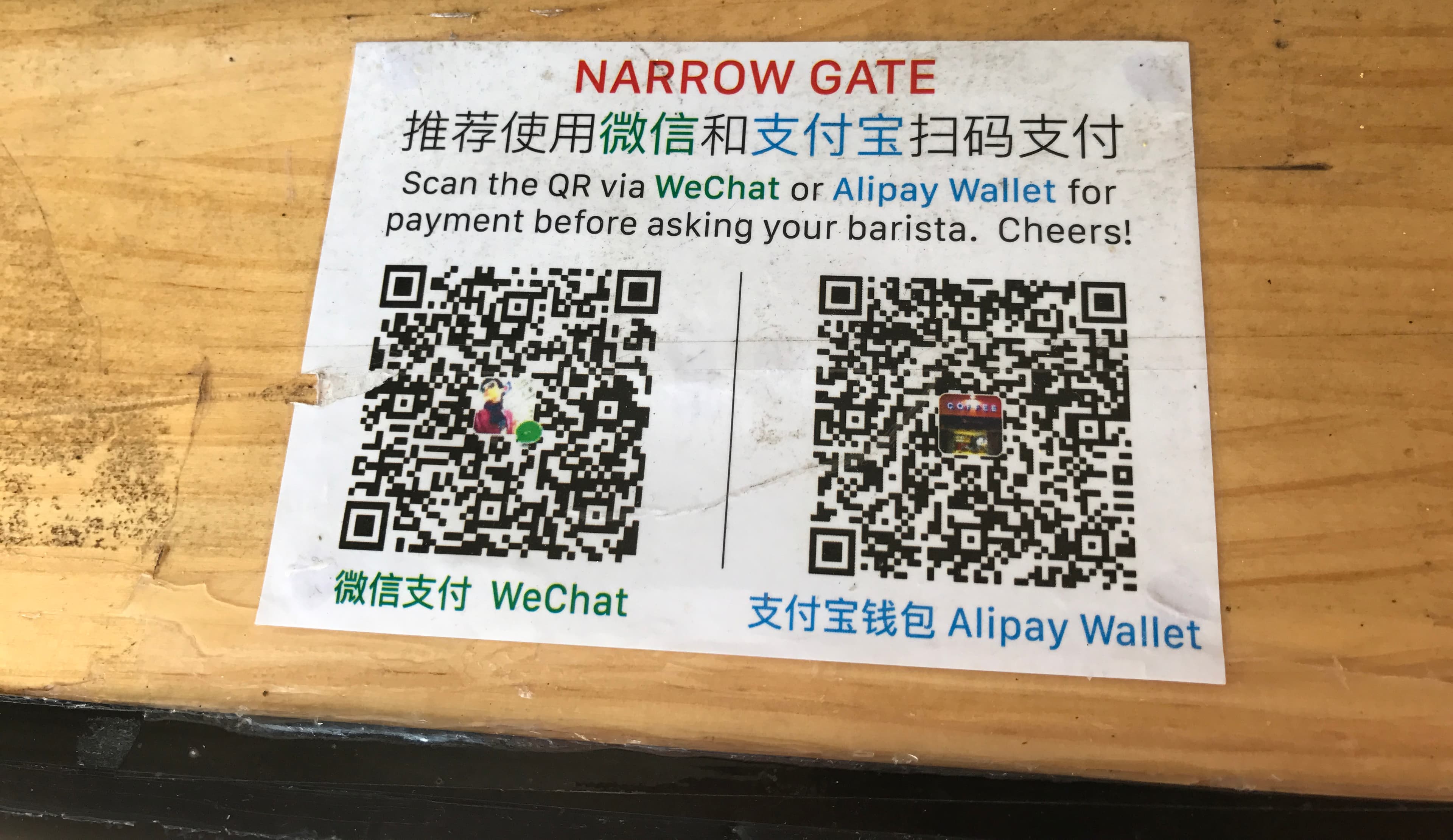
The cleaner the phone setup feels, the easier it becomes to move between metro gates, stations, and everyday spending moments.
Open related pageBefore you book
Wallet support, card binding, and visitor payment rules can change. This page keeps the core guidance close to official Tencent, Alipay, and government references.
People's Bank of China
Central-bank guide for overseas visitors covering mobile payment, bank cards, cash, and e-CNY service options.
Open sourceState Council
Government-facing payment guide that explains the visitor payment stack, including mobile payments, bank cards, and cash support.
Open sourceBeijing Municipal Government
A practical official guide covering mobile payment, bank cards, cash, and e-CNY options for international visitors.
Open sourceTencent
Tencent's official article on overseas users linking international cards and using Weixin Pay at mainland China merchants.
Open sourceShenzhen Government Online
Local-government news on the Tencent/PayPal QR-payment connection for U.S.-based PayPal users and the 2026 visitor-payment rollout around Shenzhen and APEC.
Open sourceAlipay
Official Alipay support instructions for users who need help when account, card, or payment setup gets stuck.
Open sourceNext move
Read enough to make the decision smaller, then open the checklist, search a specific question, choose a setup tool, or share the page with the person planning with you.
Use the checklist when the question has shifted from research to preparation.
Search by the actual problem: Alipay, eSIM, transit visa, first transfer, vegetarian food, or a city name.
Open recommendations when the task is clear enough for a short list to be useful.